Cloud software for the whole site lifecycle
Every asset. Every discipline. Every stage of your site and projects.
One live record for your tags, checksheets, deficiencies, RFIs and documents, so you can see what is done, what is open and who signed it without chasing paper.
Any asset
Instruments, motors, valves, piping, modules, structural steel, foundations and other civil works. If it gets checked or needs quality assurance, you can tag it, build a checksheet template for it and track it.
Any discipline
Instrumentation, electrical, mechanical, piping, civil, structural or your own list. Every checksheet and deficiency can be filtered and reported by discipline.
Any stage
From planning and construction through commissioning and into operations, across the site and every project on it. You define the phases.
One record for the whole life of your site
Plan
- Build the tag register for the site
- Load documents and link them to tags
- Set up checksheet templates, phases and sign-off levels
Build
- Check the work with checksheets as it is installed
- Raise and track deficiencies with photos or voice
- Manage RFIs, so questions get answered and the answers stay on record
Commission
- Run loop checks, solo runs and other tests from your templates
- Sign off in order, one at a time or in bulk
- Watch progress by discipline, phase and system
Operate
- Keep the tag register and documents live after handover
- Run changes through management of change, with their own checksheets
- Give operations staff free view access to the full history
From the tag register to the last sign-off
Fully digital from start to finish. No printing checksheets, and no scanning paper back in.
Tags
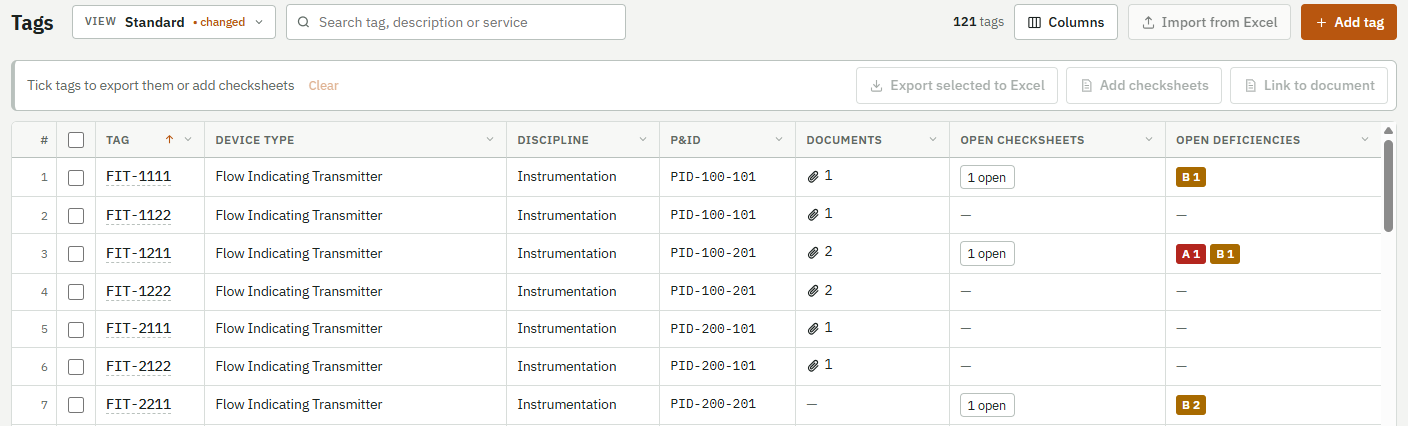
Keep one register for each site, with up to 100,000 tags. Bring your list in from Excel, filter any column, and save the views you use every day.
Checksheets
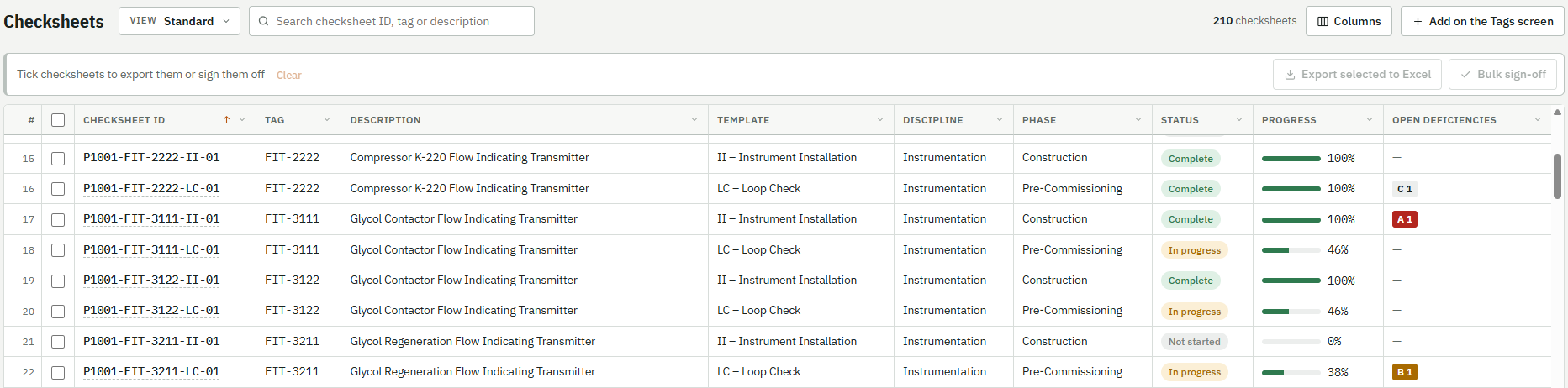
Create them from your own templates. Every answer is stamped with the person, the time and the device, and earlier revisions stay on record.
Sign-offs
Set who can sign what, by level. Sign one checksheet or a whole filtered list at once. Answers lock once signed, so the record stays true.
Deficiencies
Raise one from the task in front of you and rate it A, B or C, with photos or a voice message. Follow it from open to cleared to verified.
Progress reports
See percent complete by discipline, phase and system, a weekly burn-up, and open deficiencies by criticality. Get an automated report every month, and export any table to Excel.
Management of change
Run each MOC like a small project, with optional approval stages and its own checksheets, deficiencies and documents. It closes only when the work is done.
Don’t type it. Say it.
Typing on a tablet at the equipment is slow. Talk instead, and PBCO Lifecycle turns your message into text.
Voice deficiencies
Record up to two minutes, listen back and keep it. It becomes the written description, using your tag number and commissioning terms to get the words right. The recording stays with the deficiency.
Voice help requests
Stuck on a screen? Speak your question into Get support. It arrives as text, along with where you were working.
Each person agrees to voice recording before their first message.
Tag LIT-4231, Loop Check
Transcribed
Conduit seal is missing at the transmitter and the junction box cover is cracked. Needs a new cover before the loop can be closed out.
Your documents, right where the work is
P&IDs, loop diagrams, datasheets and vendor manuals are stored in the system as PDFs, so nobody has to dig through a shared drive at the equipment.
Linked to your tags
One document can link to many tags, and one tag to many documents. Link a whole selection of tags at once.
Open from the screen you are on
Open them from the tag page or the checksheet page. The Tags screen shows at a glance which tags have documents.
The current revision first
The latest revision is what opens. Older revisions stay available as history.
Help that answers before you have to wait
Help on every screen
Press Help on any screen or popup to see what each field, button and column does. It opens over your work, so a half-filled form is safe.
Type it or say it
Press Get support and describe the problem. The request already knows your screen, the record you have open and your filters.
An automatic first answer
You get things to try, drawn from our help topics and known fixes, in the app and by email. It never changes your data.
A person when you need one
Press I still need help, or flag the request as urgent, and it goes to our support team with everything already attached.
Built for sites with no signal at the tag
Crews check out their work on a tablet or laptop and keep going offline. It uploads when the device reaches the site office connection.
- AssignA lead sends checksheets to a specific device, with the linked drawings.
- Work offlineAnswer tasks, take photos and record voice deficiencies at the equipment.
- SubmitOn reconnect, submitted work uploads and is checked before the device clears its copy.
- ReviewThe office sees the update right away, with the full history behind it.
Pay for the people who make changes. Viewing is free.
Your whole team, your contractors and the owner can have accounts. A user only counts in a month when they change something.
Flex
For contractors and project teams whose numbers peak during commissioning. Pay for the users active each month, and invoice each project to its own PO or AFE.
Fixed
For owners and operators with steady teams. Blocks of 25 users at a lower rate. If you go over in a month, the extra users are billed for that month and work carries on.
Tablet rental and custom services are also available.
Transparency is how we work
You should never have to wonder what happened on your site, who did it, or what you are paying for.
Automated monthly reports
Every month, a report goes to your team on its own, covering progress, open deficiencies and usage. Nobody has to build it or ask for it.
See exactly what you pay for
Your usage report names every user who counted, their first and last billable day, and the storage you used. You can check it against your own records.
A name on every action
Every answer, sign-off and deficiency step shows who did it and when. Changes are added to the record, not written over it, and a sign-off taken back stays on record.
Everyone sees the same numbers
Progress comes straight from the checksheets. Viewing is free, so owners, contractors and your own team all work from the same data.
Your records stay yours
Your own database
Each client has a separate database, file storage and encryption key, never a shared pool.
Your choice of region
Your data can be kept in your own country.
Backed up
Your records and files are backed up, because commissioning evidence has to last for years.
A copy you can keep
Export a whole project as PDFs, Excel and original files that open without our software.
About us
Coming soon: who we are and why we built PBCO Lifecycle.
See it on a real checksheet
We will walk through one tag, from checksheet to voice deficiency to progress.